คู่มือทีละขั้น
Import / Export — จัดการ Master data จำนวนมากอย่างปลอดภัย
ดาวน์โหลด Template กรอกไฟล์ Validate อ่านผล Create/Update/Error และ Import ตามลำดับ Type → Category → Group → Product → Formulation
Product Admin / Data ownerอ่านประมาณ 15 นาทีอัปเดต 17 กรกฎาคม 2026
อ่านบทนี้แล้วทำอะไรได้
- เตรียมไฟล์โดยไม่แก้ sheet/header
- อ่าน Preview และ Result CSV เพื่อแก้ error ได้
- Import ข้อมูลตาม dependency โดยไม่สร้าง duplicate key
เตรียมก่อนเริ่ม
- สำรองข้อมูลปัจจุบันด้วย Export
- ใช้ Template ล่าสุดจาก module เดียวกับข้อมูล
- มี canView และ canCreate/canEdit ตามแถวที่จะนำเข้า
สารบัญในหน้านี้
1. Module ที่รองรับ
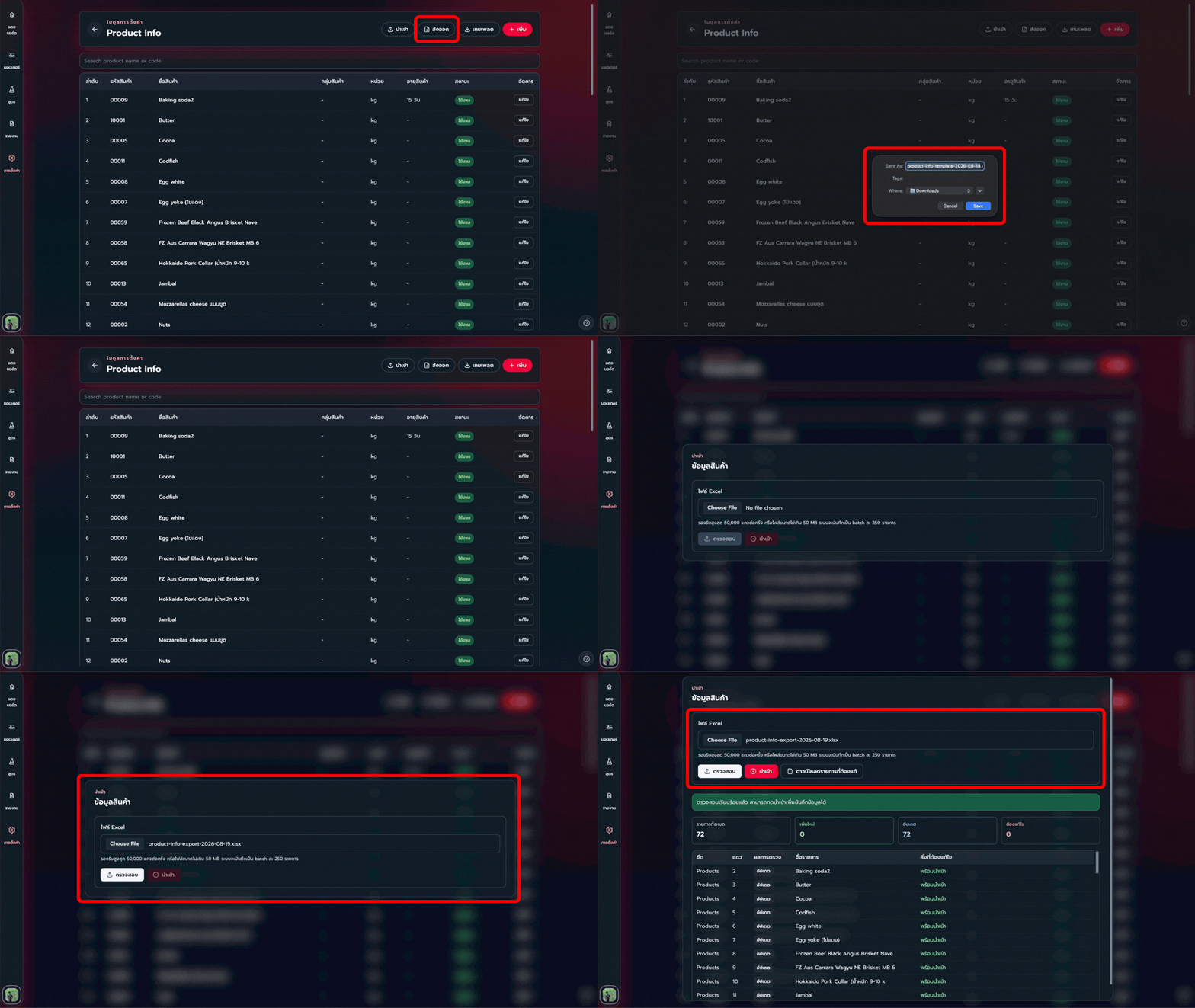
2. ขั้นตอน Import ที่ปลอดภัย
- ขั้นตอนที่ 1
Export สำรอง
เก็บไฟล์ปัจจุบันพร้อมวันที่/สาขาก่อนแก้จำนวนมาก
- ขั้นตอนที่ 2
ดาวน์โหลด Template ล่าสุด
กด Template จาก module เป้าหมายและห้ามเปลี่ยนชื่อ sheet หรือ header
- ขั้นตอนที่ 3
กรอกข้อมูล
ใช้ .xlsx หรือ .xls และรักษาชนิดข้อมูลตามตัวอย่าง
- ขั้นตอนที่ 4
Upload แล้ว Validate
ระบบสรุป Rows, Create, Update และ Error; key เดิมหมายถึง Update ส่วน key ซ้ำในไฟล์เดียวกันเป็น error
- ขั้นตอนที่ 5
แก้ Error
ดาวน์โหลด Result CSV อ่านข้อความของแต่ละแถว แก้ต้นฉบับ แล้ว Validate ใหม่
- ขั้นตอนที่ 6
Import เมื่อ Error = 0
ปุ่ม Import เปิดเมื่อ validation ผ่าน ตรวจว่า permission ครบทั้ง Create และ Update ที่พบ
- ขั้นตอนที่ 7
ตรวจหน้า List
กลับหน้า module Refresh ค้นหารายการตัวอย่าง และแจ้ง Operator refresh Offline Data
3. Header สำคัญ
4. Permission ของ Bulk action
- Export และ Template ต้องมี canView
- เปิด Import ต้องมี canCreate หรือ canEdit อย่างน้อยหนึ่งอย่าง
- แต่ละแถวที่เป็น Create ต้องมี canCreate
- แต่ละแถวที่เป็น Update ต้องมี canEdit
- อย่าผสมข้อมูลหลาย Company/Branch ในไฟล์เดียว
Continue learning
Next Steps — อ่านอะไรต่อ
เลือกบทถัดไปตามงานที่คุณกำลังตั้งค่า เพื่อเรียนต่อได้โดยไม่ข้ามขั้นสำคัญ